
Advanced Conditional Logic for Gravity Forms
From: $62.00 / year
Advanced Conditional Logic unlocks more powerful form behaviour in Gravity Forms by letting you control exactly which fields, notifications, and confirmations appear based on user input and defined rules.
Instead of duplicating fields or building workarounds, you can apply multiple logic groups to a single field.
Built for WordPress sites using Gravity Forms, the plugin helps developers, designers, and site managers create smarter forms that stay organised, scalable, and easier to manage as workflows grow.
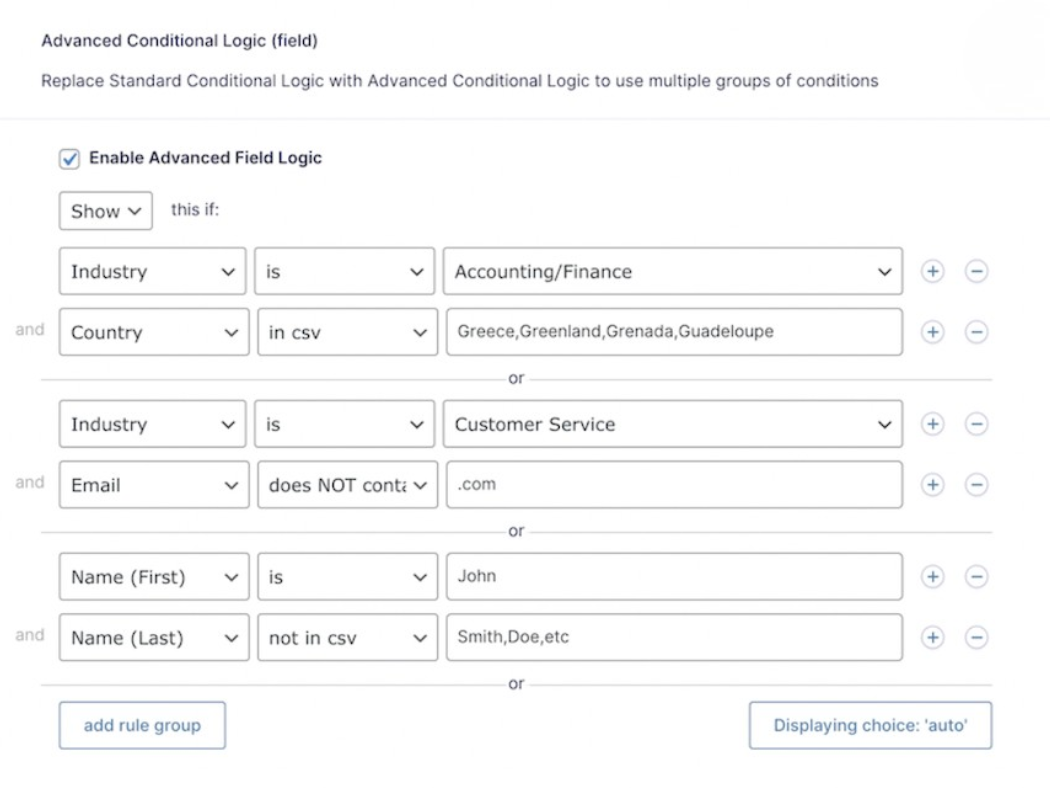
Adds Advanced Conditional Logic features to Gravity Forms, including multiple groups of logic, a “Does NOT Contain” operator, and “In CSV” and “Not in CSV” operators.
The licence purchase period is one year, renewing automatically.
Auto-renewal available
Features
- Add "Does NOT Contain" operator for both standard and advanced conditional logic *NEW*
- Use Advanced Conditional Logic to show/hide the Next button on multi page forms.
- Use Advanced Conditional Logic to show/hide the form submit button.
- Use Advanced Conditional Logic to determine which confirmation to show after right after form submission.
- Use Advanced Conditional Logic with notifications.
- Enable Advanced Logic rules to show/hide individual form fields.
- Field logic works with most plugins that rely on Gravity Forms standard Conditional Logic.
- Back-end Validation, Confirmations and Notifications obey Advanced Logic rules.
- Unlimited updates for a year
Minimum Requirements
- WordPress 6.7 or later
- Gravity Forms 2.8 or 2.9 (with a valid Gravity Forms license)
- An officially supported PHP runtime version
This plugin is based on work done by Gravity Perks.
Only logged in customers who have purchased this product may leave a review.
FAQ
This section answers the top questions on Advanced Conditional Logic, from its core purpose to its differences from Gravity Forms’ built-in logic
What does the Advanced Conditional Logic plugin do?
It allows you to build smarter forms by adding complex rules to control field visibility, submit button availability, confirmation selection, and notification conditions with far more flexibility than what Gravity Forms offers by default.
Can I use multiple conditions at once?
Yes. You can create complex conditions which compose multiple groups of conditions. Within each group conditions are combined with the “and” logic operator, and the groups are combined together using the “or” logical operator.
Does this work with calculations or product fields?
Yes.
How is this different from Gravity Forms built-in conditional logic?
The Advanced Conditional Logic plugin enables more detailed rules and additional comparison operators.

Reviews
There are no reviews yet.